
The Pervasive Portal
is a rich web hosted toolkit with advanced capabilities for monitoring and control of real-world systems. First connect sensors and actuators using a pre-integrated Pervasive IoT “Agent” device, then use the Pervasive Portal to configure, manage and monitor those devices. View sensor data in graphs, tables or drag-and-drop-configurable mimic panels, and enter behaviour rules using simple expressions. No computer code required! It’s a managed service with real people to help (or do the configuration for you).
Agents in the field connect with the Portal using built-in, pre-integrated 4G or 3G cellular modems, or a Satellite backhaul. This secure channel is bi-directional for both inbound data and outbound control, configuration and OTA (Over The Air) firmware updates.
Pervasive Portal Tour
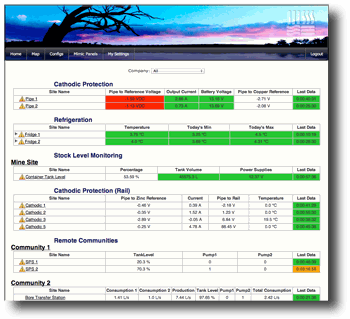
Overview Page
The Overview page shows a list of all your assets divided into Locales. Locales help to localise assets into geographic groups for management and access control.
Each line on the overview page represents one Site. Each Site represents one Agent device, its current status including outstanding alarms, latest data and last reporting time.
Cells are colour coded using traffic light indications (green, amber, red) to indicated status of each parameter.

Maps
The Map view shows field assets on a map. The map view provides quick access to information in geographic context. Where there are pending alarms, an Alarm icon is shown over the Locale or Site icon.
Clicking on an icon will zoom into the Locale.
Each Site is also shown on the map. Sites use icons which describe their role. Clicking on these icons will show the current status of that site. Clicking on the detail will take you to Graphs, Settings and Data.
Maps are powered by Google Maps. Pan and zoom as well as a range of label and map options are available from all map views.

Sites
A Site represents a single Agent. The Site encapsulates settings, configurations, data, reports and alarms.
The Site forms a virtual backup of hardware. If an Agent fails, its last operational state is stored in the Site. A new agent can take over where the other left off within moments of replacement.

Locales
Locales are a way to group Sites and Users for logical organisation and access control. Usually sites are grouped by location or community. Locales also contain Mimic Panels that can consolidate and display information for a number of Sites in that Locale.

Graphs
The Pervasive website features rich graphing capabilities including:
- A wide range of graph types
- Easy configurability
- Live data update with pre-fetch
- Client server technology
- Touch gesture support (Android and iOS)
- Data aggregation
- Analytics and curve fits
- International time support
- Multiple traces (up to 8 per graph)
- Alarm and note overlays

Tabular Data
- Data may be viewed in tabular form, the page features:
- Efficient navigation (time stamp preview).
- Column resizing.
- Data prefetch.
- Touch support (Android and iOS).
- Live update Export – A Range of Data Export Formats including CSV, Excel and XML.

Mimic Panels
Mimic Panels are a live diagram showing how the system is operating. At a glance both the functional layout and operation of a system may be assessed.
The Pervasive Portal delivers Mimic Panels with descriptive animation and live data. When Mimic Panels are active, Agents deliver changes in real time to keep the visual presentation consistent with events in the field.
Mimic Panels support modern web browsers (HTML5 or Flash compatible) and mobile devices using iOS, Android and Windows Mobile.

Replication
In cases where heavy analysis on historical data is desired or a customer wishes to maintain their own live data backup, Pervasive IoT is happy to provide live replication services.
Information arriving from field devices to our servers is replicated to one or more servers at your location of choice in real time.
Another option is to publish data via MQTT (MQTT (Message Queuing Telemetry Transport) which is an ISO standard publish-subscribe-based messaging protocol.

Alarms
Agents may be programmed to detect Alarm conditions. Alarms are delivered through our servers to designated users via SMS and email.
Alarms are also logged on the server and listed under the Site-Alarm tab. Visual indications are activated on the Overview Page, Locale and Site icons on Maps. Visual indications remain active until an authorised person has responded to the alarm and cleared it with a message which then forms part of the Alarm history.

User Management
The Pervasive Portal provides rich user management capabilities. Access can be provided with varying levels of visibility and control.
Features include :
- Access by Company and Locale View, Settings, Alarms, Programming and Administration rights.
- Unique Rights Profiles / Company for the same user.
- “Do not disturb”, Alarm time scheduling.
- International time zone support.
- SMS and email notifications.
- Detailed audit trail.
- Simple rights administration.

Reports
The Pervasive Portal provides automated report generation where gathered data is summarised and delivered to stakeholders via email. Reports can be scheduled to be produced and delivered automatically or created and delivered on demand. Reports can be created right from within the website.

Configuration & Programming
Programming and configuration of Agents is a service included in the monthly per site fee. In most cases either a phone or email request is all that is required for configuration changes to be carried out by Pervasive IoT staff.
In cases where the customer wishes to write their own programs or to have detailed visibility on exactly what the code does, access to the configurations and web based code development tools can be provided.
All the tools that we use for the development of Configurations and Mimic Panels are available through the website to our customers.
Schedules
Advanced scheduling features make lighting control and irrigation applications simple and accessible. The Pervasive Portal makes city-wide management of these assets available across your organisation.